

Using Bitmojis as an Extension in Google Chrome, it is super-easy to create our own marking stamps. You could use these as stickers in paper-based marking or if you add them into Google Keep you can use them as part of Comment Banks n marking paperless assignments in Google Docs. This is how I used these, having developed the idea from my colleague, Dan Fitzpatrick. You can follow Dan on https://twitter.com/DanFitzRS or www.danfitzpatrick.org
This is the link to a presentation I did at a TeachMeet in Blackburn in July 2017. Tasked with 10minutes to share something with fellow teachers, I presented how my foray into the world of Google for Education had revolutionised my teaching and made me want to embrace 21st Century learning. I shared my Googly moments of Harvey Bishop sharing what he had learnt on YouTube about Philosophy, proving the classroom didn't mean to be the Sage on the Stage any longer...and my 'There must be more to life than this' moment when faced with a pile of assessments, writing the same comments twenty times or more and finding the magic that is Keep comment banks that integrate with Google Docs = mind officially blown!
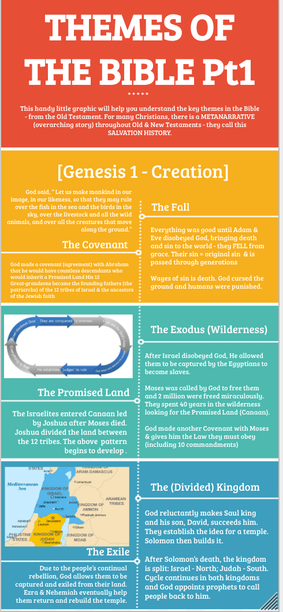
I have spent a significant amount of time playing around with Google Drawings to make graphics, posters, handouts...all to make the learning experience more creative and visually stimulating. This infographic used a variety of features and templates to illustrate the Themes of the Bible for a Year 1 A-Level Religious Studies class. It acted as a go-to and reference point so that they knew the over-arching meta-narrative of Scripture. Using a variety of fonts, limiting the use of long paragraphs and interspersing this with some imagery helped this to work. There is also the possibility of making this a digital document with links and embedded videos but I didn't use this functionality here. There are a number of excellent practitioners who give great advice on developing Google Drawings. Check them out. |



|
|
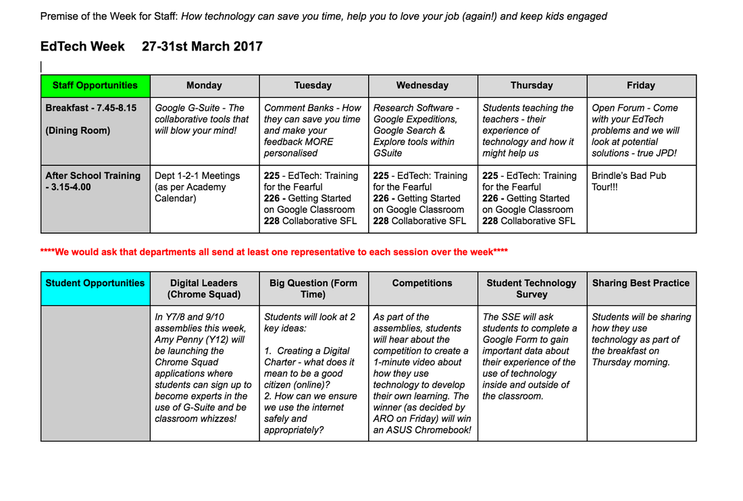
So in order to launch the use of Google's Suite for Education (GSuite), we held our first EdTech Week in March (followed up by another in June). The whole focus was to highlight how technology can save you time, help you to love your job (again!) and keep kids engaged.
A whole host of activities were held for staff and students, including daily showcase breakfasts, peer CPD training on all things Google, the launch of our Chrome Squad - Google Gurus - our Student Digital Leaders, and a range of competitions. Due to our partners at ASUS, we were able to give away a Chromebook to a Y9 student who made an awesome video of how technology develops her learning! We had 5 members of staff become Google Certified Educators, with a whole heap more on their way. Additionally, 15 students started their CS training with Google and students and staff alike had a refresh or a re-igniting of their love of technology in education. |
